Sunday, September 21, 2014

Blog Post #5 Post #1

Before this blog post I didn't know what a PLN was. I have now discovered thanks to Dr. Strange's assignment post, Developing A Personal Learning Network, what a PLN is. In the post he explains the characteristics of a PLN, how to establish a PLN, and examples of people to follow. He also gives examples about his own PLN's. I found this source the most helpful because it gives you all of the information about a PLN that you need to know.
When developing my PLN, I chose Symbaloo as my source. I started out exploring Symbaloo through settings and setting up my account. I entered all of my data in as well as changed my background. I began adding a few links to my PLN such as my blog and the EDM310 class blog. I have found Symbaloo very helpful thus far. I am intrigued and excited to explore and learn more.
Thursday, September 11, 2014
C4T #1
The Teacher that I was assigned to is David McCullough. He is a history teacher that does a lot of fun things in his classroom. The title of his blog Speaking of History...a blog about history, technology, and learning.
My first comment was a post replying to Mr. McCullough blog post about his students getting computers in the classroom. In this first post I introduced myself and told him a little bit about what we do in EDM310. I continued to tell him that I thought the kids getting computers to work on in class was rather exciting and that I would have loved to work on a computer in class when I was in middle school. I also gave him my contact info so that he could contact me back or leave me a comment... Well he didn't.
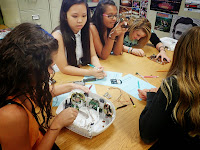
My second comment was a comment on a post from August 18. On this post he explains of an activity the kids do in class. This activity consists of kids taking technological devices such as televisions, radios, and speakers. He explains the kids liked the activity and were interested in what was in the inside of these items. He explains that the children do not know what some of the inside pieces are but further in the year they might. My comment read that I thought this was a fun activity for the kids to do. I think the kids would enjoy getting to take apart an Iphone or Ipad because they are some of the newest forms of technology that are commonly used. I really enjoyed reading Mr. McCullough's Blog. You should take the time to read it too!

My first comment was a post replying to Mr. McCullough blog post about his students getting computers in the classroom. In this first post I introduced myself and told him a little bit about what we do in EDM310. I continued to tell him that I thought the kids getting computers to work on in class was rather exciting and that I would have loved to work on a computer in class when I was in middle school. I also gave him my contact info so that he could contact me back or leave me a comment... Well he didn't.

My second comment was a comment on a post from August 18. On this post he explains of an activity the kids do in class. This activity consists of kids taking technological devices such as televisions, radios, and speakers. He explains the kids liked the activity and were interested in what was in the inside of these items. He explains that the children do not know what some of the inside pieces are but further in the year they might. My comment read that I thought this was a fun activity for the kids to do. I think the kids would enjoy getting to take apart an Iphone or Ipad because they are some of the newest forms of technology that are commonly used. I really enjoyed reading Mr. McCullough's Blog. You should take the time to read it too!

Project #15 Search Engines
Wolfram Alpha, is a site engine that gives you information about anything you want to know about or calculate. I am currently reading Great Expectations by Charles Dicks and I put that in the search and everything I need to know about the book is there. I also typed in, “How many days until Christmas” because Christmas is my favorite time of the year. The exact number of days came up, as well as other important days. I find this very helpful if I need to know a calculation or information about anything specific.

Duck Duck Go, is the first engine that I picked. After asking once again, “How many days until Christmas”, it gave me a specific number of days and also gave me different sites underneath about the topic I asked about. After entering in Great Expectations it popped up just as Google would if you entered it in there. The first site one the page was Wikipedia, and the second was Spark notes. I think this site would be good if you needed to know multiple websites to look at for information about something. It works like Google.

Dogpile is my second pick. This search engine gives you categories of things you want to search. Such as, web, images, video, news, local, shopping, and white pages. After picking your category, you can type what you want to search in the blank. I find this useful because it is a search engine that combines Google and Yahoo into one. This means that you get double the results when searching.

My third choice is Ixquick search engine. This search engine is kind of plain in a way. It doesn’t give the searcher many results. It has tabs you can choose from such as web, images, videos, and phone. The only thing I found helpful in this search engine is the fact that you can actually look up phone numbers for businesses or people. Besides looking up phone numbers I didn’t find this search engine helpful at all.

Yahoo is the fourth search engine I explored. I haven’t ever really used Yahoo I’ve always used Google for searching. Yahoo looks amazing. I believe you could find anything on Yahoo. It has so many things you can look at and explore. It has different and more complex tabs such as health, style, dating, and travel. This engine also has the weather on it as well as the newest movies, trends, and news circulation around in todays society. It also has what’s trending and games. Searching and playing around on this engine will leave you with endless possibilities. This search engine is my favorite so far.
![Yahoo]()
Bing is the next search engine I have looked at. Bing is similar to Yahoo. Bing gives you choices that you can pick from when entering your search such as videos, news, maps, and more etc. This search engine does well when searching for things, but it isn’t quite as complex as Yahoo. On the bottom of the screen it gives the viewer some insider on what is happening in todays society. I like this search engine. I think it would be useful in searching anything you would search in Google, but it still doesn’t live up to the standards of Yahoo.
![Bing]()
Excite is a search engine similar to Bing and yahoo except it looks a little outdated. It has updated information such as the Ray Rice case in the NFL. It gives you Business News, Technology News, Health News, Entertainment News, and Top News. Even being outdated this search engine still offers valuable information. You can Explore, Book Flights, Play games, and create your own page. This search engine would work just as Google does. I wouldn’t say this is my favorite search engine. It needs to be upgraded and creatively structured.

Ask is the last search engine I have explored. Ask looks just as complex as Bing. The thing I like about Ask is that it gives you a question of the day. I think this is really cool when wanting to learn new facts. It also gives you the previous questions under the question for that particular day. The other search engines didn’t have this, so that is the only difference from Bing. I find this helpful when wanting to know certain websites for things. It works the same way as bing but is less complex than others such as Yahoo and Google.

Duck Duck Go, is the first engine that I picked. After asking once again, “How many days until Christmas”, it gave me a specific number of days and also gave me different sites underneath about the topic I asked about. After entering in Great Expectations it popped up just as Google would if you entered it in there. The first site one the page was Wikipedia, and the second was Spark notes. I think this site would be good if you needed to know multiple websites to look at for information about something. It works like Google.
Dogpile is my second pick. This search engine gives you categories of things you want to search. Such as, web, images, video, news, local, shopping, and white pages. After picking your category, you can type what you want to search in the blank. I find this useful because it is a search engine that combines Google and Yahoo into one. This means that you get double the results when searching.
My third choice is Ixquick search engine. This search engine is kind of plain in a way. It doesn’t give the searcher many results. It has tabs you can choose from such as web, images, videos, and phone. The only thing I found helpful in this search engine is the fact that you can actually look up phone numbers for businesses or people. Besides looking up phone numbers I didn’t find this search engine helpful at all.
Yahoo is the fourth search engine I explored. I haven’t ever really used Yahoo I’ve always used Google for searching. Yahoo looks amazing. I believe you could find anything on Yahoo. It has so many things you can look at and explore. It has different and more complex tabs such as health, style, dating, and travel. This engine also has the weather on it as well as the newest movies, trends, and news circulation around in todays society. It also has what’s trending and games. Searching and playing around on this engine will leave you with endless possibilities. This search engine is my favorite so far.

Bing is the next search engine I have looked at. Bing is similar to Yahoo. Bing gives you choices that you can pick from when entering your search such as videos, news, maps, and more etc. This search engine does well when searching for things, but it isn’t quite as complex as Yahoo. On the bottom of the screen it gives the viewer some insider on what is happening in todays society. I like this search engine. I think it would be useful in searching anything you would search in Google, but it still doesn’t live up to the standards of Yahoo.

Excite is a search engine similar to Bing and yahoo except it looks a little outdated. It has updated information such as the Ray Rice case in the NFL. It gives you Business News, Technology News, Health News, Entertainment News, and Top News. Even being outdated this search engine still offers valuable information. You can Explore, Book Flights, Play games, and create your own page. This search engine would work just as Google does. I wouldn’t say this is my favorite search engine. It needs to be upgraded and creatively structured.
Ask is the last search engine I have explored. Ask looks just as complex as Bing. The thing I like about Ask is that it gives you a question of the day. I think this is really cool when wanting to learn new facts. It also gives you the previous questions under the question for that particular day. The other search engines didn’t have this, so that is the only difference from Bing. I find this helpful when wanting to know certain websites for things. It works the same way as bing but is less complex than others such as Yahoo and Google.
Wednesday, September 10, 2014
Blog Post #4
In The Right Way to Ask Questions in the Classroom, the goal of the question is very important. We must all understand that teachers do not know everything and they make mistakes. When asking questions we must think of what we want the class to learn from the questions asked. We also have to understand that even though a student may think he or she understands the material he or she may not and they just don’t know it yet. If we want all of the students to participate we should have a system that calls each students name to answer a question per day. If not, when asking questions we must pause for a moment while we wait for the students to think of the answer.
In Asking Questions to Improve Learning, it gives you general strategies for asking questions. We need to keep in mind that we ask questions for students to improve their critical thinking skills. We can do this by following a yes or no question with an additional question. As teachers, we also need to make sure the question has a clear specific answer. Questions should also be planned in a class session. The reading states that the student answering the question shouldn’t be interrupted when answering which I think is perfectly true. If a student is interrupted he or she will be less likely to answer another question in class.
In Three Better Ways to Ask Questions in the Classroom, it also states that teachers should prepare the questions to ask. I find this very effective so the teacher can decide if the question is open ended or a yes or no question. This also can help decide if the question is effective to he learner. This site also says like the others before that the teacher should leave the question unanswered for some time so the children can think about their responses.
In Asking Better Questions in the Classroom , Joanne says that college professors expect feedback from students in the classroom. She gives examples of close ended and open ended questions. She talks about how important open ended questions are. She says they encourage feedback and leaves the respondent to provide more information and think more deeply. I agree with this and I have professors that do both in every class I attend. Thinking deeply gets the brain going and it gets the brain in habit of continuing to think deeper.
In Questioning Styles and Strategies, the teacher gives many techniques. Personal Writing and Queuing being one of them. He asks the children many different questions about the book. He also asks the students to give their responses that they recorded. I like this technique because he gives the students time to think and put their thoughts on paper. I also like the fact that the teacher put all of the different types of questions into one setting in the classroom. I think this technique was very effective. The responses that the students give should also be analyzed and explained in further detail.
In Teach Students to Ask Their Own Questions, it encourages teachers to get students to start asking their own questions as well as building off of their peers questions. The site gives you different tabs that can help such as Practice, Development, Teacher Participation, and Why Questions Matters. After reading the responses from real teachers about questions, it gives all teachers room for improvement. After reading these tips and thinking differently about the questioning system used in the classroom, I have learned a lot about asking questions and receiving questions from a teachers aspect.
In Open Ended Questions, Andi gives different ways to change close-ended questions into open-ended questions. She gives examples of different ways to change these by using “Explain in detail”, “Generate a list of (blank)”, and “For what reasons?”. She also gives the listener her contact info and encourages the viewer to contact her for professional help. I think this was inviting because we haven’t been to a source yet that does this for the viewer. Although this video was short, it was very helpful in ways of changing questions.

In Asking Questions to Improve Learning, it gives you general strategies for asking questions. We need to keep in mind that we ask questions for students to improve their critical thinking skills. We can do this by following a yes or no question with an additional question. As teachers, we also need to make sure the question has a clear specific answer. Questions should also be planned in a class session. The reading states that the student answering the question shouldn’t be interrupted when answering which I think is perfectly true. If a student is interrupted he or she will be less likely to answer another question in class.
In Three Better Ways to Ask Questions in the Classroom, it also states that teachers should prepare the questions to ask. I find this very effective so the teacher can decide if the question is open ended or a yes or no question. This also can help decide if the question is effective to he learner. This site also says like the others before that the teacher should leave the question unanswered for some time so the children can think about their responses.
In Asking Better Questions in the Classroom , Joanne says that college professors expect feedback from students in the classroom. She gives examples of close ended and open ended questions. She talks about how important open ended questions are. She says they encourage feedback and leaves the respondent to provide more information and think more deeply. I agree with this and I have professors that do both in every class I attend. Thinking deeply gets the brain going and it gets the brain in habit of continuing to think deeper.
In Questioning Styles and Strategies, the teacher gives many techniques. Personal Writing and Queuing being one of them. He asks the children many different questions about the book. He also asks the students to give their responses that they recorded. I like this technique because he gives the students time to think and put their thoughts on paper. I also like the fact that the teacher put all of the different types of questions into one setting in the classroom. I think this technique was very effective. The responses that the students give should also be analyzed and explained in further detail.
In Teach Students to Ask Their Own Questions, it encourages teachers to get students to start asking their own questions as well as building off of their peers questions. The site gives you different tabs that can help such as Practice, Development, Teacher Participation, and Why Questions Matters. After reading the responses from real teachers about questions, it gives all teachers room for improvement. After reading these tips and thinking differently about the questioning system used in the classroom, I have learned a lot about asking questions and receiving questions from a teachers aspect.
In Open Ended Questions, Andi gives different ways to change close-ended questions into open-ended questions. She gives examples of different ways to change these by using “Explain in detail”, “Generate a list of (blank)”, and “For what reasons?”. She also gives the listener her contact info and encourages the viewer to contact her for professional help. I think this was inviting because we haven’t been to a source yet that does this for the viewer. Although this video was short, it was very helpful in ways of changing questions.
Sunday, September 7, 2014
Blog Post #3
The video What is Peer Editing?is very useful when learning the proper way to peer edit. When peer editing we are cautious about what we say so that we will not hurt the persons feelings. This video tells us that the proper way to start off a comment is to compliment the person. I feel like this is very useful because it starts the comment off with a good vibe. Then it proceeds to tell us that we need to stay positive throughout the comment. It gives us the idea that instead of telling the person that his or her post is bad, we should make suggestions on how to improve this. If someone commented on one of my posts this way, I would greatly appreciate it and feel like they were trying to help instead of bashing my work.
I really like the slideshow Peer Edit With Perfection Tutorial editing is revising, improving, and editing someones paper that is your own age. This powerpoint also tells the reader to be cautious of what they say to the writer. It reminds us to talk to them the way we would want them to talk to us. This powerpoint also tells the reader to start off with compliments as the youtube video did. I think this is a great start to a comment or edit. It gives you the same pointers as the first video did and gives you some things to practice while reading the powerpoint.
The video Writing Peer Review Top 10 Mistakes is my favorite source from this group of sources. The way the kids made the lesson fun made me want to pay more attention. This source also gave us new pointers when peer reviewing. I feel that the other two sources were repeats of the same information. This source gave us new information such as "Too Loud Larry", being a factor when peer reviewing. This is true as are others when dealing with face to face peer review.

I really like the slideshow Peer Edit With Perfection Tutorial editing is revising, improving, and editing someones paper that is your own age. This powerpoint also tells the reader to be cautious of what they say to the writer. It reminds us to talk to them the way we would want them to talk to us. This powerpoint also tells the reader to start off with compliments as the youtube video did. I think this is a great start to a comment or edit. It gives you the same pointers as the first video did and gives you some things to practice while reading the powerpoint.
The video Writing Peer Review Top 10 Mistakes is my favorite source from this group of sources. The way the kids made the lesson fun made me want to pay more attention. This source also gave us new pointers when peer reviewing. I feel that the other two sources were repeats of the same information. This source gave us new information such as "Too Loud Larry", being a factor when peer reviewing. This is true as are others when dealing with face to face peer review.
Subscribe to:
Posts (Atom)